 |
 |
 |
pNbody |  |
 |
|
|
|
|
pNbody | |
|
|
Instead of using pNbody in the python interpreter, it is very usefull to use pNbody in scripts. Usually
a python script begin by the line #!/usr/bin/env python and must be executable (chmod a+x file.py).
As an example (slice.py), we show how to write a script that opens a gadget file, select gas and cut a thin
slice (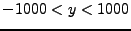 ). The new files are saved using the extention .slice.
#!/usr/bin/env python

import sys
from pNbody import *

files = sys.argv[1:]

for file in files:
  print "slicing",file
  nb = Nbody(file,ftype='gadget')
  nb = nb.select('gas')
  nb = nb.selectc((fabs(nb.pos[:,1])<1000))
  nb.rename(file+'.slice')
  nb.write()
You can run this script with the command
[lunix@lunix ~]$ ./scripts/slice.py gadget_z*0.dat
[lunix@lunix ~]$ python ./scripts/slice.py gadget_z*0.dat
In the current version of pNbody, scripts may also be used in parallel, if mpi and mpi4py is installed. In this case, run the script with a command like (depending of your mpi implementation):
[lunix@lunix ~]$ mpirun -np 2 slice.py gadget_z*0.dat
Instead of opening one file and writing another, one can ask that every processus open one file and write one. First, modify the previous script by adding the command nb.set_pio('yes') The script split.py demonstrate this capabilites.
#!/usr/bin/env python

import sys
from pNbody import *

files = sys.argv[1:]

for file in files:
  nb = Nbody(file,ftype='gadget')
  nb.set_pio('yes')	# enable parallel input/output
  nb.write()
[lunix@lunix ~]$ mpirun -np 2 ./scripts/split.py gadget_z*0.dat
Now that you have created two output, try to read them. In the script slice.py, add a pio='yes' in the object argument.
#!/usr/bin/env python

import sys
from pNbody import *

files = sys.argv[1:]

for file in files:
  print "slicing",file
  nb = Nbody(file,ftype='gadget',pio='yes')
  nb = nb.select('gas')
  nb = nb.selectc((fabs(nb.pos[:,1])<1000))
  nb.rename(file+'.slice')
  nb.write()
[lunix@lunix ~]$ mpirun -np 2 ./scripts/slice2.py gadget_z*0.dat
Now, the script works fully in parallel. Every processus reads, writes and works on its own file, correspondig to a subset of the total number of particles.
Lets try two other scripts. The first one try to find the radial maximum distance among all particles and the center. It illustrate the difference between using max() wich gives the local maximum (maximum among particles of the node) and mpi.mpi_max() which gives the global maximum among all particles.
#!/usr/bin/env python

import sys
from pNbody import *

file = sys.argv[1]

nb = Nbody(file,ftype='gadget',pio='yes')
local_max  = max(nb.rxyz())
global_max = mpi.mpi_max(nb.rxyz())

print "proc %d local_max = %f global_max = %f"%(mpi.ThisTask,local_max,global_max)
[lunix@lunix examples]$ mpirun -np 2 ./scripts/findmax.py gadget_z00.dat
proc 0 local_max = 12070.458008 global_max = 12757.492188
proc 1 local_max = 12757.492188 global_max = 12757.492188
#!/usr/bin/env python

import sys
from pNbody import *

file = sys.argv[1]

nb = Nbody(file,ftype='gadget',pio='yes')
nb.display(size=(10000,10000),shape=(256,256),palette='light')
[lunix@lunix examples]$ mpirun -np 2 ./scripts/showmap.py gadget_z00.dat
|
|
|
pNbody | |
|
|