mpi4py does not currently works with the standard python interpreter. This prevents us
to works whith models interactively in parallel.
However, using gwin, while displaying your model in a window, you can interact with it in
parallel. Try to run (here, we assume you are using mpich-2 as mpi implementation):
[lunix@lunix examples]$ mpirun -np 2 gwin -t gadget gadget_z00.dat
Figure 3.1:
Snapshot of gwin.
|
|
With your mouse, you can interact with the model.
While pressing the left button of your mouse, move it on the map. The red axis at the center
moves and determines the observer orientation.
A right click redisplays the model.
You will find a more complete documentation of gwin futher in this document.
Here, weonly focus on some parallel features.
Try node info on the Operations menu. You get the number of particles contained
by each processus as well as the number particles of each type.
Now, we can interact with the model using the bottom entry, at the left of the clear button.
The commands you can entrer here are similar to the one used in the python console or in python scripts.
The only (but major difference) is that the variable representing the model object is called
self.nb instead of nb.
Try for example :
self.nb.translate([3125,-4690,1720])
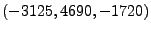 .
Now select a small region around this point :
.
Now select a small region around this point :
self.nb = self.nb.selectc((self.nb.rxyz()<500))
Release 4.0, documentation updated on February 2008.
See About this document... for information on suggesting changes.


![\includegraphics[width=14cm]{graph/gwin1.ps}](img3.png)