 |
 |
 |
pNbody |  |
 |
|
|
|
|
pNbody | |
|
|
These functions are not methods of the Nbody object. However, there are useful to process some outputs of Nbody methods.
| x,y) |
Return the cross product of two  arrays.
| a,bins) |
Return the histogram ( Float0 Numeric array) of the Float0 Numeric array a.
bins (
Float0 Numeric array) of the Float0 Numeric array a.
bins ( Float0 Numeric array) specify the bins of the histogram.
| [nr],[nt],[rm]) |
Return a sequence of number ( Float0 Numeric array), where  defined by:
![\begin{displaymath}
R_j = \rm {rm}\frac{exp\left[ j /\left( \frac{1}{2}+\frac{\...
...1)/\left( \frac{1}{2}+\frac{\rm {nt}}{2\pi} \right) \right]-1}
\end{displaymath}](img43.png) |
(8.1) |
>>> from Nbody import *
>>> getr()
array([  0.00000000e+00,   7.69677545e-02,
	      1.69004032e-01,   2.79058904e-01,
	      4.10659999e-01,   5.68025574e-01,
	      7.56199722e-01,   9.81214059e-01,
	      1.25028105e+00,   1.57202519e+00,
	      1.95675946e+00,   2.41681589e+00,
	      2.96694083e+00,   3.62476762e+00,
	      4.41138184e+00,   5.35199710e+00,
	      6.47676327e+00,   7.82173290e+00,
	      9.43001676e+00,   1.13531658e+01,
	      1.36528233e+01,   1.64027011e+01,
	      1.96909419e+01,   2.36229450e+01,
	      2.83247442e+01,   3.39470479e+01,
	      4.06700700e+01,   4.87093057e+01,
	      5.83224396e+01,   6.98176049e+01,
	      8.35632603e+01,   1.00000000e+02])
| x0,xp,alpha,dr) |
 Float0 Numeric array).
>>> from pNbody import *
>>> get_eyes([0,-50,50],[0,0,0],0,5)
(array([  5., -50.,  50.], type=float32), array([ -5., -50.,  50.], type=float32))
| mat,[filter_name],[filter_opts]) |
Apply a filter on an Float0 Numeric array.
The only supported filter has filter_name='convol' and
filter_opts=(nx,ny,sx,sy). The filter operates a convolution of
the array with a Gaussian kernel of half width sx and sy truncated
on radius nx and ny.
 Float Numeric array)
>>> from pNbody import *
>>> from numarray import random_array as RandomArray
>>> mat = RandomArray.random([256,256])
>>> mplot(mat)
>>> mat = apply_filter(mat,name='convol',opt=[10,10,3,3])
>>> mplot(mat)
| mat,[scale],[cd],[mn],[mx]) |
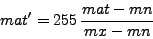
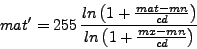
Transform an Float Numeric array into an Int0 Numeric array that will be
used to create an image. The float values are rescaled and cutted in order to range between 0 and 255.
The function returns the new Int0 array mat and the used values of mn,
mx and cd.
Float Numeric array)
If mn or mx are not defined, they are set to the minimum and maximum value of mat.
 |
(8.2) |
 |
(8.3) |
>>> from pNbody import *
>>> n = 256
>>> x,y = indices((n+1,n+1))
>>> x = 2*pi*(x-n/2)/(n/2)
>>> y = 2*pi*(y-n/2)/(n/2)
>>> R = sqrt(x**2+y**2)
>>> R1 = sqrt((x-pi)**2+(y-pi)**2)
>>> mat = cos(R)/(1+R) + 0.5*cos(R1)/(1+R1)
>>> mplot(mat)
>>> mat_int,mn,mx,cd = set_ranges(mat,scale='lin',mn=0,mx=0.5)
>>> mplot(mat_int)
| m,matint,[nl],[mn],[mx],[kx],[ky],[color],[crush]) |
Compute iso-contours on a Float Numeric array.
Contours computed from mat are superposed on the integer matrix
matint.
Float Numeric array)
Int Numeric array)
If l_min equal l_max, levels are automatically between the minimum and maximum values of the matrix mat. If color=0, no contour are displayed.
>>> from pNbody import *
>>> n = 256
>>> x,y = indices((n+1,n+1))
>>> x = 2*pi*(x-n/2)/(n/2)
>>> y = 2*pi*(y-n/2)/(n/2)
>>> R = sqrt(x**2+y**2)
>>> R1 = sqrt((x-pi)**2+(y-pi)**2)
>>> mat = cos(R)/(1+R) + 0.5*cos(R1)/(1+R1)
>>> mat_int,mn,mx,cd = set_ranges(mat,scale='lin')
>>> mat_int = contours(mat,mat_int,nl=30,mn=mn,mx=mx,kx=10,ky=10,color=1)
>>> mplot(mat_int)
>>> mat_int = contours(mat,mat_int,nl=30,mn=mn,mx=mx,kx=10,ky=10,color=1,crush='yes')
>>> mplot(mat_int)
| matint,[shape=(256,256)],[size=(30.,30.)],[box_opts=(0,None,None,255)]) |
Superpose of box to the matrix matint.
Int Numeric array)
\begin{verbatim}
>>> from pNbody import *
>>> from numarray import random_array as RandomArray
>>> mat = RandomArray.random([256,256])
>>> mat = apply_filter(mat,name='convol',opt=[10,10,3,3])
>>> mat_int,mn,mx,cd = set_ranges(mat,scale='lin',mn=0,mx=0.5)
>>> mat_int = add_box(mat_int,shape=(256,256),size=(100,100),box_opts=(1,None,None,1))
>>> mplot(mat_int)
| mat,[palette='light'],[save='no']) |
Plot a or save the matrix array mat.
>>> from pNbody import *
>>> from numarray import random_array as RandomArray
>>> mat = RandomArray.random([256,256])
>>> mplot(mat)
>>> mplot(mat,save='image.gif')
>>> mplot(mat,save='image.fits')
| mat,[name],[palette_name]) |
From the Int Numeric array, create a PIL
(Python Image Library) image.
If name is given, the image is saved on the disk.
palette_name is the name of the palette and is one of the following:
aips0, backgr, bgyrw, blackwhite, blue, blulut, color, green, half, heat,
idl11, idl12, idl14, idl15, idl2, idl4, idl5, idl6, isophot, light, lut0,
lut1, lut2, lut3, lut4, lut5, lut6, lut7, lut8, lut9, manycol, pastel, pmar,
rainbow, rainbow1, rainbow2, rainbow3, rainbow4, ramp, random, random1,
random2, random3, random4, random5, random6, real, red, smooth, smooth1,
smooth2, smooth3, staircase, stairs8, stairs9, standard, whiteblack
>>> from pNbody import *
>>> from numarray import random_array as RandomArray
>>> mat = RandomArray.random([256,256])
>>> mat_int,mn,mx,cd = set_ranges(mat,scale='lin')
>>> image = get_image(mat_int,palette_name='rainbow4')
| image) |
Display in a TK window the image image (PIL image).
>>> from pNbody import *
>>> from numarray import random_array as RandomArray
>>> mat = RandomArray.random([256,256])
>>> mat_int,mn,mx,cd = set_ranges(mat,scale='lin')
>>> image = get_image(mat_int,palette_name='rainbow4')
>>> display(image)
| shape,size,[lweight=1],[xticks=None],[yticks=None],[color=255]) |
Return a matrix of integer, containing a box with labels
| matint,m0,d0,n0,h0,shape,size,center,color) |
Return a matrix of integer, containing ticks in x.
| matint,m0,d0,n0,h0,shape,size,center,color) |
Return a matrix of integer, containing ticks in y.
| nb,mode='m',obs=None) |
Return a specifc value extracted from the pNbody object nb according to the mode mode. These function is used in the method ComputeMap.
| mode='m') |
Return 'normal' or 'in projection' depending on the mode mode. These function is used in the method ComputeMap.
|
|
|
pNbody | |
|
|